
I'm a cybersecurity expert — and I almost fell for this phishing attack.
No joke. No clickbait. I was sitting at my computer, mouse hovering over the "Sign in" button of a Google login window, when something felt off. A split-second gut feeling was all that stood between me and handing my entire Google account over to criminals.
What nearly got me wasn't a Nigerian prince, a poorly formatted PayPal link, or a typo-riddled text message. It was a professional project brief — complete with a calendar booking, follow-up email, four-page PDF, and a login window that looked completely legitimate even under close inspection.
The Attack, Step by Step
It all started innocuously enough. Someone booked an appointment through our website — via our custom-built scheduling tool — for an initial consultation. The topic: rebuilding an existing company website. Completely routine for us at Golle IT. The meeting was about a week out.
We looked up the company. Their website was in maintenance mode, and there wasn't much else to find online. Unusual, but not alarming — small and mid-sized businesses don't always have a strong web presence.
Three days before the meeting, an email arrived. Professionally written, with a company signature, sent as a reply to the Google Calendar invitation. The message: they have a budget, the old site is outdated (hence the maintenance mode), and they're planning a full redesign. Attached: a four-page PDF with detailed specifications for what the new website should do.
Four pages. That's not the kind of effort a mass phisher puts in. That's targeted, deliberate attack planning.
The email also included a request: to prepare for the meeting, we should review the PDF, assess whether the budget was realistic — and log into their old WordPress site to view the existing content despite the maintenance mode.
So I clicked the link to the old website. There I found a login page with a "Sign in with Google" button — single sign-on, the kind you see on dozens of services. The email said I should use it to create a new account.
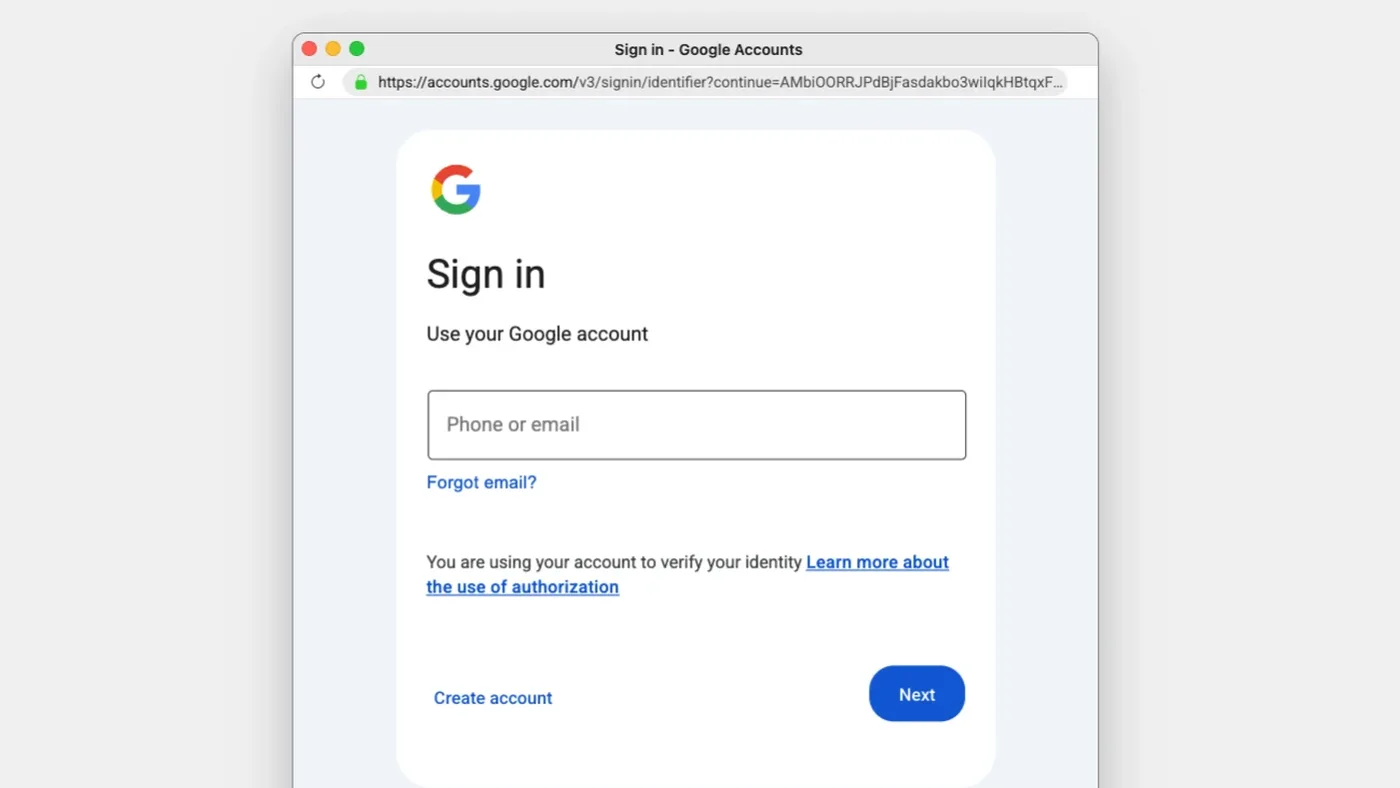
I clicked the Google SSO button. A popup appeared. It looked exactly like the real Google login window. The URL in the popup's address bar showed accounts.google.com. The design, fonts, spacing — everything was spot on.
Then I noticed something: I could drag the popup around within the browser window — but not outside of it. It wasn't a real browser window. It was an HTML element, styled to look like a Chrome popup.
That's when I knew: this was phishing.
The Tech Behind It: Browser-in-the-Browser
This technique has a name: Browser-in-the-Browser (BitB). A freely available phishing toolkit allows attackers to simulate convincingly real Chrome windows as HTML/CSS overlays within a webpage — including a fake address bar displaying any URL they choose.
It sounds simple. Technically, it is. But the impact is devastating, because we've all been trained to treat the URL in the address bar as the ultimate trust signal. If it says accounts.google.com, it must be Google. That's exactly the trust this attack exploits.
As Malwarebytes explains: at its core, BitB is a social engineering technique that weaponizes users' trust in familiar browser UI elements.
But what set this particular attack apart from older BitB variants: the fake popup was actually communicating with Google in the background. When I tested it by entering an invalid email address, I got an error — "Couldn't find your Google Account." With a wrong password: "Wrong password." The system was validating my inputs in real time against actual Google servers.
For the victim, this feels like a completely normal authentication flow. No warning signs. No errors. Everything as expected — right up until your credentials land in the attacker's hands.
Why Freelancers and Agencies Are the Perfect Target
This attack wasn't randomly aimed at a web agency. It was designed for us.
Freelancers and small agencies are constantly receiving inquiries from strangers. We open documents from people we've never met. We click links to websites we've never seen. We use Google Workspace for everything — email, calendar, Drive, Meet. And we don't have a SOC team, enterprise-grade email filtering, or endpoint detection.
A freelancer's Google account is a goldmine: client communications, contracts, invoices, OAuth connections to dozens of other services. Compromise that account, and you have access to someone's entire digital business life.
The data backs this up. Credential theft is now the most common way attackers gain access to systems. Dark Reading reports that 97% of all identity attacks are password-based. Attackers aren't breaking in anymore — they're logging in.
And we freelancers make it easy for them. Not because we're careless, but because our working context is structurally vulnerable.
The Uncomfortable Truth: Awareness Training Isn't Enough Anymore
Here's the part where I take a position that a lot of people won't like.
Traditional phishing awareness — "watch for bad grammar, check the sender, don't click suspicious links" — is structurally outdated.
This attack had perfect grammar. A professional email signature. A four-page specification document. A Google login popup with a legitimate-looking URL. There were no "suspicious signs" — that was the whole point.
Anyone who thinks they'd spot phishing hasn't understood the problem. BitB is explicitly built to be undetectable. Attack techniques are evolving through documented generations: BitB (2022), ClickFix (2024), Sneaky 2FA (2025), ConsentFix (2026). Each generation is harder to detect than the last.
My takeaway from this experience: the only reliable defense is technical, not cognitive. No human can consistently distinguish a BitB popup from a real Chrome window — not under time pressure, not in the middle of a busy workday, not when everything else about the interaction looks completely plausible.
What You Should Do Right Now
Here are four steps you can take today. None of them require an IT team:
1. Use a Password Manager
A password manager like 1Password or Bitwarden will only autofill credentials on the real domain. If the URL in the actual browser address bar isn't accounts.google.com — and in a BitB attack, it never is — nothing gets filled in. The manager catches the fake, even when you don't.
2. Enable a Hardware Security Key or Passkey
FIDO2-based authentication (YubiKey, Google Titan, or passkeys on your phone) is phishing-resistant by design. The key cryptographically verifies the domain. A fake popup on a third-party domain can't trigger the key. This is the single most powerful protection you can put in place.
3. Audit Your Google Account for Unknown Third-Party Apps
Go to myaccount.google.com → Security → Third-party apps with account access. Remove anything you don't recognize. OAuth-based attacks can gain access to your account without ever knowing your password.
4. Question Login Prompts in Unfamiliar Contexts
If a third-party website asks you to sign in with Google: open a new browser tab, navigate manually to accounts.google.com, and sign in there. If the SSO flow is legitimate, it'll work automatically afterward. If it's not, you just stopped an attack.
Share This Article — Seriously
I'm not writing this to show off. I'm writing it because I know that most people in my circle — clients, friends, business partners — would have fallen for this attack. Not out of negligence, but because it was genuinely well-crafted.
The simplest protective measure you can take right now: send this article to three people who regularly receive project inquiries from strangers. Freelancers, agency owners, independent consultants. The people who work in exactly the context this attack was built for.
And if you have questions about your own security posture — whether you're a freelancer, an agency, or a business — reach out to me. Cybersecurity isn't a luxury. It's basic hygiene. If this article hasn't convinced you of that, I'm not sure what will.